AI bots now scan the web faster and more aggressively than ever. Tools like ChatGPT, Perplexity, and Claude rely on these crawlers to fetch new content. They scan millions of web pages to improve their models. Often, they do this without clear limits or permissions. That might sound harmless. However, for business owners, these bots can become a real problem.
AI Bots Are Hitting WordPress Sites Harder Than Ever
Cloudflare recently rolled out a big update that changes how AI bots access websites. It introduces a permission-based system. In simple terms, websites can now tell AI crawlers: “No, you can’t scrape here.” This is a major shift. Furthermore, it’s good news for sustainability and ultimately the environment. Less unnecessary scraping means fewer wasted server resources and energy.
However, it’s disappointing to see that WordPress wasn’t listed among the global platforms embracing this model. Drupal made the list. WordPress, the world’s most-used CMS, did not. That’s frustrating, especially considering the millions of WordPress sites affected by AI bots every day.
How Cloudflare Helped Stop AI Bots Overloading a WordPress Website
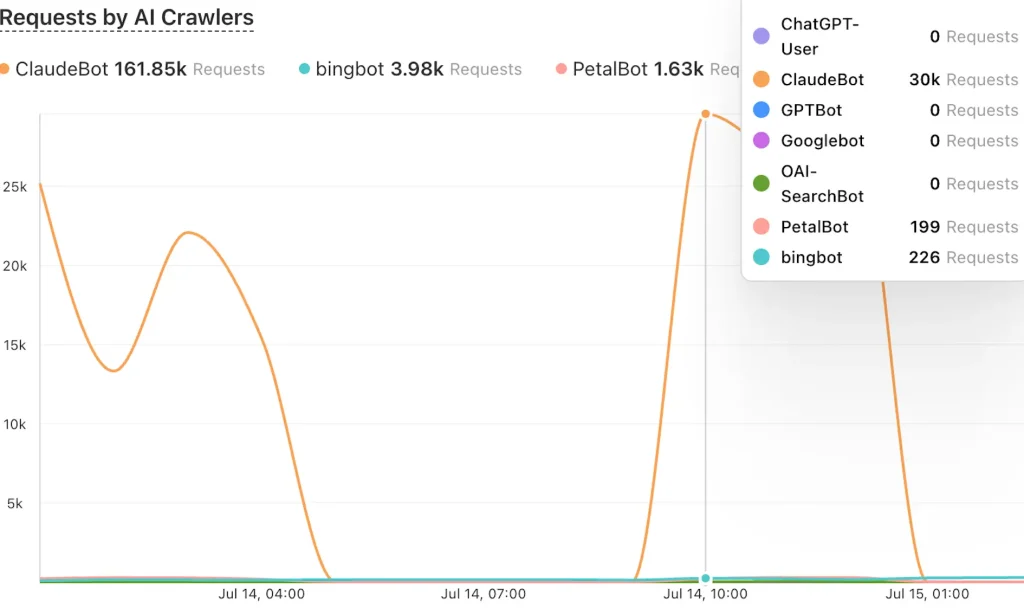
I saw the damage AI bots can do first-hand when a client’s WordPress powered website went down. Their site runs a WooCommerce store with a search and filter plugin. Unfortunately, AI bots hit the site and got trapped in an infinite search loop. They made endless requests and hammered the server. It acted like a friendly DDoS. It wasn’t malicious. Even so, it broke the website. As a result, sales stopped and customers couldn’t browse products. The site was down for hours until I stepped in.
The immediate solution came from Cloudflare. I switched on the “Block AI crawlers” feature in the dashboard. Within minutes, the server load dropped. The bots stopped and the website came back online. In this case, a simple change brought a big result. For WordPress business owners, this is an easy win.
A more longterm fix is investigating and removing the ability to get trapped in an infinite search loop in the first place, however, an immediate solution was required.
Other Ways to Block AI Bots From WordPress, Without Cloudflare
If you face a similar issue but don’t use Cloudflare, there’s other methods you can use. For example, you can block AI crawlers through your .htaccess file, if using Apache. I’ve shared an example on GitHub:
This lets you block common AI crawlers by user agent. That includes bots from OpenAI, Anthropic, and others. In addition, it gives you more control at the server level.
If you’re running WordPress and worried about AI bots slowing you down or hurting your WooCommerce sales, don’t wait. Get in touch. I offer WordPress support and maintenance for all businesses. Let’s keep your site fast, secure, and under your control, whilst caring about sustainability.
