From over a decade of offering WordPress support in both the UK and globally, I have seen Gravity Forms data retention overlooked far too often. Gravity Forms is a trusted plugin for collecting enquiries, bookings, and feedback. However, many site owners forget to plan how long form data should stay stored.
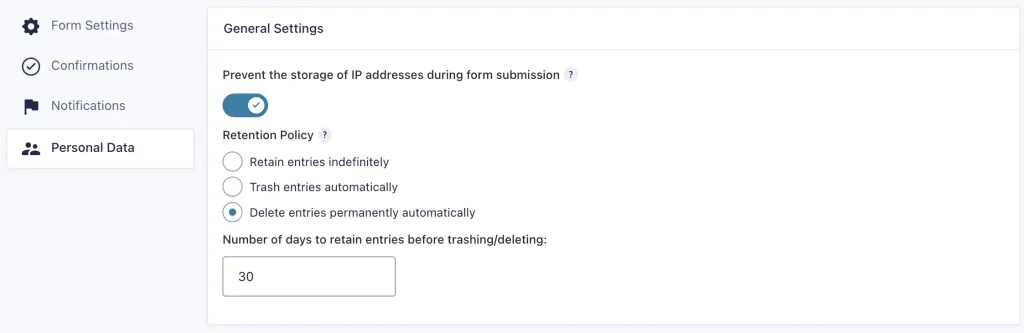
By default, Gravity Forms does not set any data retention policy. Submissions can stay in your database unless you take action. Every WordPress developer should raise this before handing a project to a client.
Ultimately the client is responsible for their own data retention policy, however, developers should still start the conversation early. This step is vital for privacy, GDPR compliance, and overall site security.
Why Gravity Forms Data Retention Matters
A Gravity Forms data retention policy defines how long form submissions stay on your site before deletion. Keeping data forever creates risk. It increases exposure to data breaches and makes compliance harder.
Ask yourself key questions.
Do you need to store form data locally?
Does the form send data to a CRM or another system?
Do you already get the same information by email?
If yes to any of these, you may not need to store it in WordPress.
Therefore, decide how long you actually need to keep submissions. Many site owners choose 30 days, 90 days, or 120 days. Some even prefer one year if there is a clear business reason, which is still better than indefinite. Anything longer than 30 days should really be justified and reviewed often.
Keep Only What You Need, Do No Harm
For privacy and security, shorter retention is safer. The less data you keep, the lower the risk. Therefore, review each form and collect only what is essential.
Never gather data “just in case.” Under GDPR, you must only collect what you truly need for your service. Storing unnecessary data increases your liability and reduces trust.
Sensitive documentation such as ID scans or medical records should not go through Gravity Forms unless absolutely required. If you must collect that kind of data, you will need stronger security controls. I will discuss that in a future post.
Think, if the form is collecting CV submissions, why do you need to retain the CV beyond the hiring process? The likely answer is you don’t.
Final Thoughts
A clear Gravity Forms data retention policy (and for any other form you may be using) protects your visitors and your business. It keeps your WordPress database clean, supports GDPR compliance, and reduces potential security problems.
Whether you handle everything yourself or work with a WordPress support developer, always include data retention in your project checklist. In the end, good data management is just as important as good design.
If you prefer to work with a WordPress support developer who will flag these situations at an early stage and throughout the support contract then please get in contact to discuss your project.
